
An action in RAP is a non-standard modifying operation that is part of the business logic.
The standard use case of an action is to change specific fields of a business object entity. When using an action, it is not the standard update operation that is called, but the action with the predefined update implementation.
On a Fiori UI, this means that the consumer of the Fiori app can change the state of an individual business object instance without having to switch to edit mode. The application developer provides action buttons for the action to be executable directly from a list report or an object page.
Let’s understand this from our Billing Document app point of view.
Billing Document use case
In our Billing Document Header entity, we have a Billing Date field. We can change the state of an instance, meaning a particular Billing Document record, and update the Billing Date field without editing the record.
This is achieved using an instance-based action.
Instance means a single billing document record.
Using actions, we can:
-
Create an instance
-
Update an instance
-
Implement complex procedures such as calling a third-party API
-
Fulfill any custom business requirement
How do we implement an action in a RAP app?
The implementation consists of four steps:
-
Define action in behavior definition
-
Implement action in behavior implementation class
-
Expose action in behavior projection
-
Expose action at UI level in Metadata Extension
Types of actions in RAP
How many types of actions can we create in RAP? Too many.
-
Instance action
-
Internal action
-
Static action
-
Repeatable action
-
Factory action
-
Save action
And perhaps by the time you read this blog, more types may be introduced.
In this blog, we focus on instance actions and keep the example intentionally simple.
Step 1: Define action in Behavior Definition (BDEF)
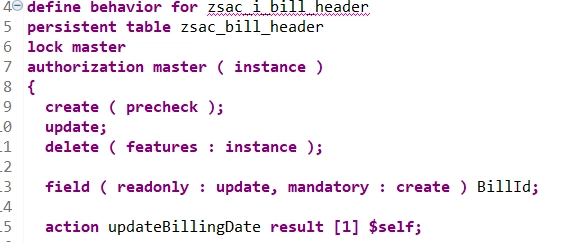
Define the action in the behavior definition as shown below:
action updateBillingDate result [1] $self;
Understanding the result parameter
The output parameter for an action is defined using the keyword result. It can be used to store the result of an action in an internal table.
The return type of the result parameter can be an entity or a structure:
-
$self
Specifies that the result type is the same type as the entity for which the action or function is defined. -
entity OutputParameterEntity
Specifies that the result is a different CDS view entity of the same or another business object. -
ResultParameterStructure
A RAP Abstract Behavior Definition can be specified as a return type.
Cardinality of the result parameter
[1] defines the cardinality of the output parameter. This is a mandatory addition if the action returns anything.
The following cardinality values can be specified:
-
[0..1] -
[1] -
[0..*] -
[1..*]
Step 2: Implement action in Behavior Implementation Class
As soon as you define the action in the BDEF, ADT provides a quick fix to implement the action method. Once generated, you can write your business logic in the behavior implementation class.
Below is the sample logic to update the billing date to the current system date:
METHOD updateBillingDate.

  MODIFY ENTITIES OF ZSAC_I_BILL_HEADER IN LOCAL MODE
        ENTITY ZSAC_I_BILL_HEADER
           UPDATE FROM VALUE #( FOR key IN keys
           ( BillId   = key-BillId
             BillDate = cl_abap_context_info=>get_system_date( )
             %control-BillDate = if_abap_behv=>mk-on ) )
           FAILED failed
           REPORTED reported.

  "Read changed data for action result
  READ ENTITIES OF ZSAC_I_BILL_HEADER IN LOCAL MODE
    ENTITY ZSAC_I_BILL_HEADER
    ALL FIELDS WITH
    CORRESPONDING #( keys )
    RESULT DATA(lt_billdocs).

  result = VALUE #( FOR ls_billdoc IN lt_billdocs
           ( %tky   = ls_billdoc-%tky
             %param = ls_billdoc ) ).

ENDMETHOD.
As you can see, the result parameter is filled with the updated instance, ensuring the UI receives the refreshed billing date.
Step 3: Expose action in Behavior Projection
Next, expose the action in the behavior projection.
projection;
strict ( 2 );

define behavior for zsac_c_bill_header
{
  use create;
  use update;
  use delete;

  use action updateBillingDate;

  use association _Item { create; }
}

define behavior for zsac_c_bill_item
{
  use update;
  use delete;

  use association _Header;
}
Just like standard operations such as Create, Update, and Delete, non-standard operations like actions must also be explicitly exposed.
Step 4: Expose action at UI level in Metadata Extension
Finally, expose the action at the UI level.
Add the following line to UI.lineItem or UI.identification depending on whether you want the action on the list report or object page:
{ position: 10, type: #FOR_ACTION,
  dataAction: 'updateBillingDate',
  label: 'Reset Billing Date' }
And cut. We did it.
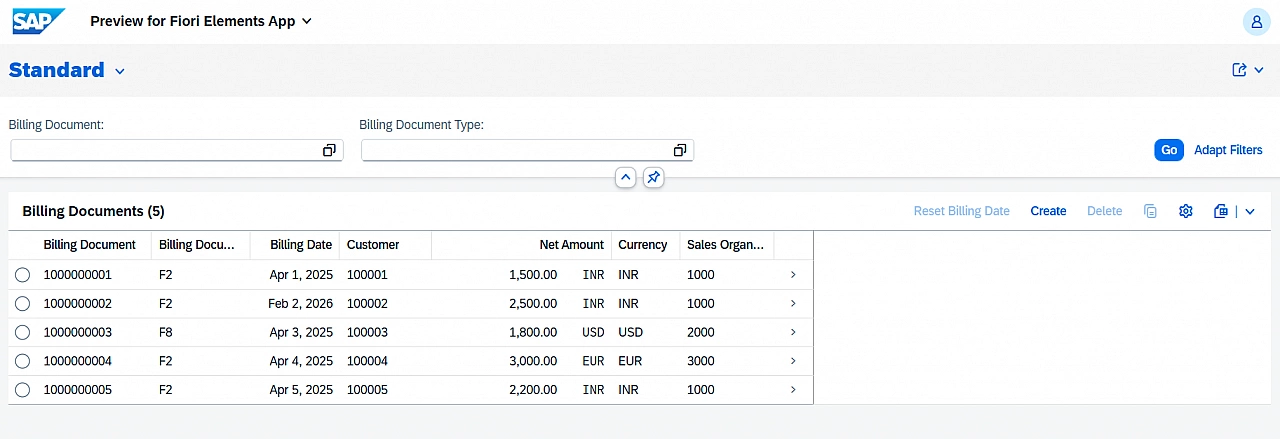
Observe that the Reset Billing Date action is disabled since no instance (record) is selected.
Once you select a record, the action becomes enabled.
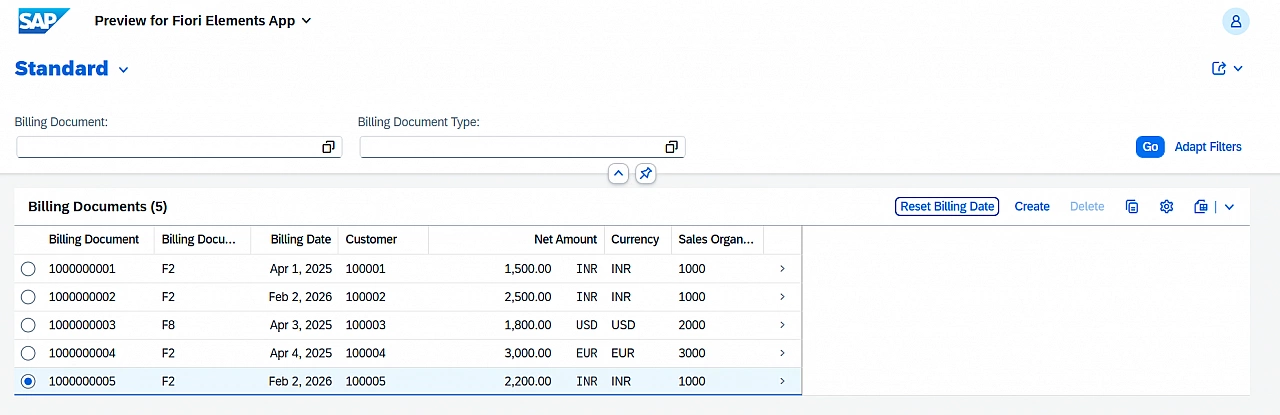
Your task
In this example, the action is exposed only at the line item level.
Your task is to expose the same action on the object page and verify the behavior.
Here is the SAP Help documentation for RAP actions: https://help.sap.com/docs/abap-cloud/abap-rap/actions
Keep learning.
Thanks for reading.