
So far in our billing document app, the system allows all operations.
We can:
-
create documents
-
update them
-
delete them
-
edit every field
But real business applications rarely behave like this.
Sometimes behavior depends on conditions.
For example:
-
A document should not be deleted for certain currencies
-
A field should become non-editable based on values
-
Creation should be blocked during a specific time window
We are not validating data here.
We are controlling whether the operation itself should be available.
In RAP, this is handled using Feature Control.
The Idea
Instead of letting the user perform an action and then throwing an error, RAP allows us to stop the action from being available in the first place.
So the system behavior becomes:
If business rules do not allow an operation, the operation is disabled.
And because this decision belongs to the business object, it automatically applies to UI, API and EML consumers.
Static vs Dynamic Feature Control
Before implementing anything, it is important to understand that not all feature control requires coding.
Some restrictions never change.
Some depend on conditions.
RAP separates these into static and dynamic feature control.
Static Feature Control
Static means the rule is always true for every instance.
We already used this earlier without calling it feature control:
field ( readonly : update, mandatory : create ) BillId;Here:
-
BillId must be entered during creation
-
After creation it can never be changed
This restriction does not depend on data or time.
So RAP handles it directly from the behavior definition.
Typical static cases:
-
ID cannot be edited after creation
-
Field must be filled during create
-
Technical fields hidden or protected
No handler method required.
Dynamic Feature Control
Dynamic means the availability depends on conditions.
For example:
-
Field editable only for certain currency
-
Delete allowed only for certain documents
-
Creation blocked during specific hours
Now RAP needs logic to decide the behavior at runtime.
For that we use:
features : instance
features : global
And implement handler methods.
That is what we will implement next.
How This Worked in Classical SAP
In classical GUI transactions, this was usually handled in screen logic.
You may remember situations like:
-
Delete button disappears after posting
-
Fields turn grey
-
Editing blocked for specific conditions
Technically the screen was modified.
In RAP we do not modify screens.
We define the allowed behavior of the business object and the UI adjusts automatically.
What We Will Implement
We will apply feature control on Billing Document Header.
Rules:
-
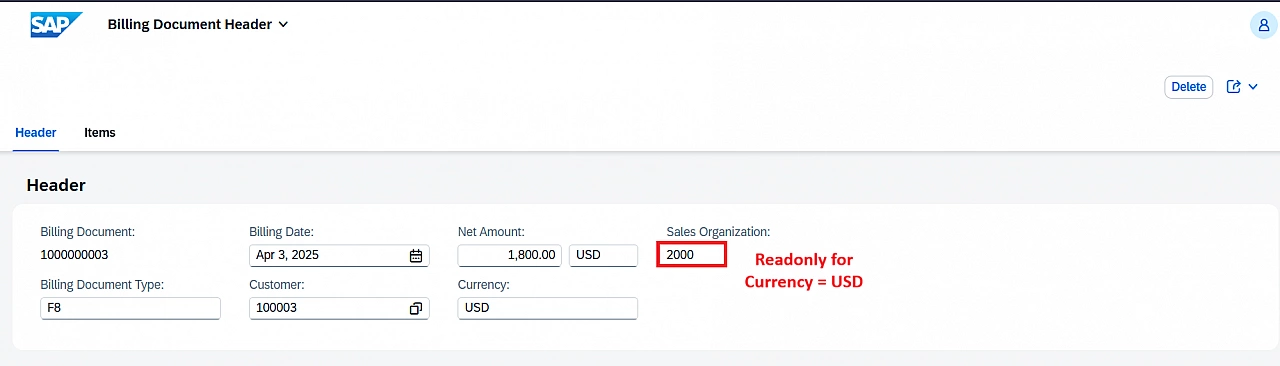
If Currency = USD → Sales Organization cannot be edited
-
If Currency = INR → Document cannot be deleted
-
Creation not allowed between 6 AM and 9 AM
Some rules depend on the document.
Some rules depend on the system.
Behavior Definition
Update the behavior of Billing Document Header with feature control attributes as below -
define behavior for zsac_r_bill_headtp
persistent table zsac_bill_header
lock master
authorization master ( instance )
{
  create (precheck, features : global);
  update;
  delete ( features : instance );

  field ( readonly : update, mandatory : create ) BillId;

  field ( features : instance ) SalesOrg;

  association _Item { create; }
}
We are telling RAP:
-
Creation availability decided globally
-
Delete availability decided per document
-
SalesOrg editability decided per document
Types of Dynamic Feature Control
Instance Feature Control
Instance feature control depends on the data of that specific document.
So two billing documents may behave differently. Below is how we implement it -
METHOD get_instance_features.

  READ ENTITIES OF zsac_r_bill_headtp IN LOCAL MODE
       ENTITY zsac_r_bill_headtp
       FIELDS ( Currency ) WITH CORRESPONDING #( keys )
       RESULT DATA(lt_billdoc).

  result =
    VALUE #( FOR ls_billdoc IN lt_billdoc
      ( %key = ls_billdoc-%key

        %features-%field-SalesOrg =
            COND #( WHEN ls_billdoc-Currency = 'USD'
                    THEN if_abap_behv=>fc-f-read_only
                    ELSE if_abap_behv=>fc-f-unrestricted )

        %features-%delete =
            COND #( WHEN ls_billdoc-Currency = 'INR'
                    THEN if_abap_behv=>fc-o-disabled
                    ELSE if_abap_behv=>fc-o-enabled )
       ) ).

ENDMETHOD.
Now:
-
USD document → Sales Org read only
-
INR document → Delete disabled
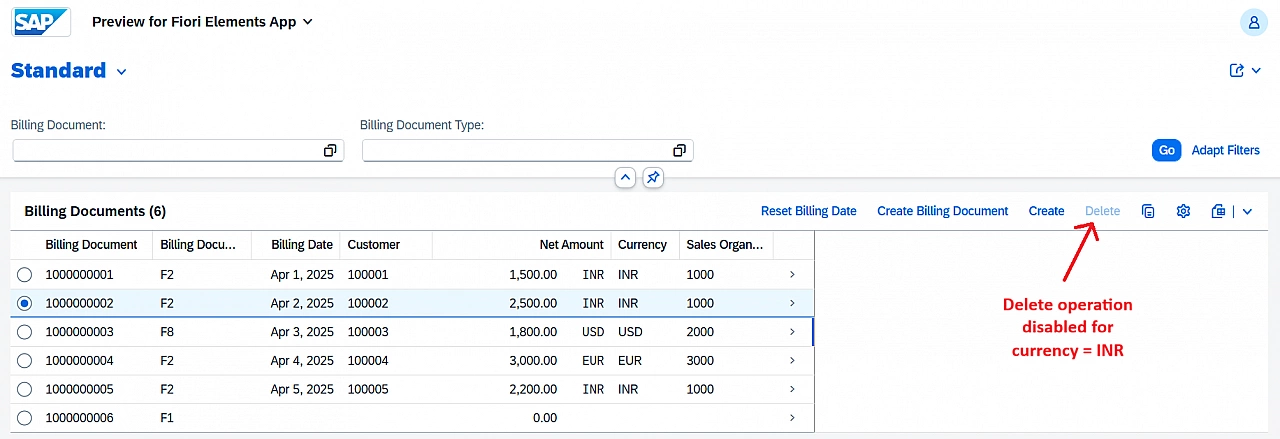
The UI reflects whatever the business object decides.
Global Feature Control
Now we restrict creation during a system time window.
METHOD get_global_features.

  DATA(time1) = CONV t( '060000' ).
  DATA(time2) = CONV t( '090000' ).

  DATA(lv_current_time) = cl_abap_context_info=>get_system_time( ).

  result = VALUE #( %create = COND #(
              WHEN lv_current_time GT time1 AND lv_current_time LT time2
              THEN if_abap_behv=>fc-o-disabled
              ELSE if_abap_behv=>fc-o-enabled )
                  ).

  IF result-%create = if_abap_behv=>fc-o-disabled.
    APPEND VALUE #( %msg  = new_message_with_text(
          text     = 'Create is not allowed between 6 AM and 9 AM.'
          severity = if_abap_behv_message=>severity-error )
          %global = if_abap_behv=>mk-on )
          TO reported-zsac_r_bill_headtp.
  ENDIF.

ENDMETHOD.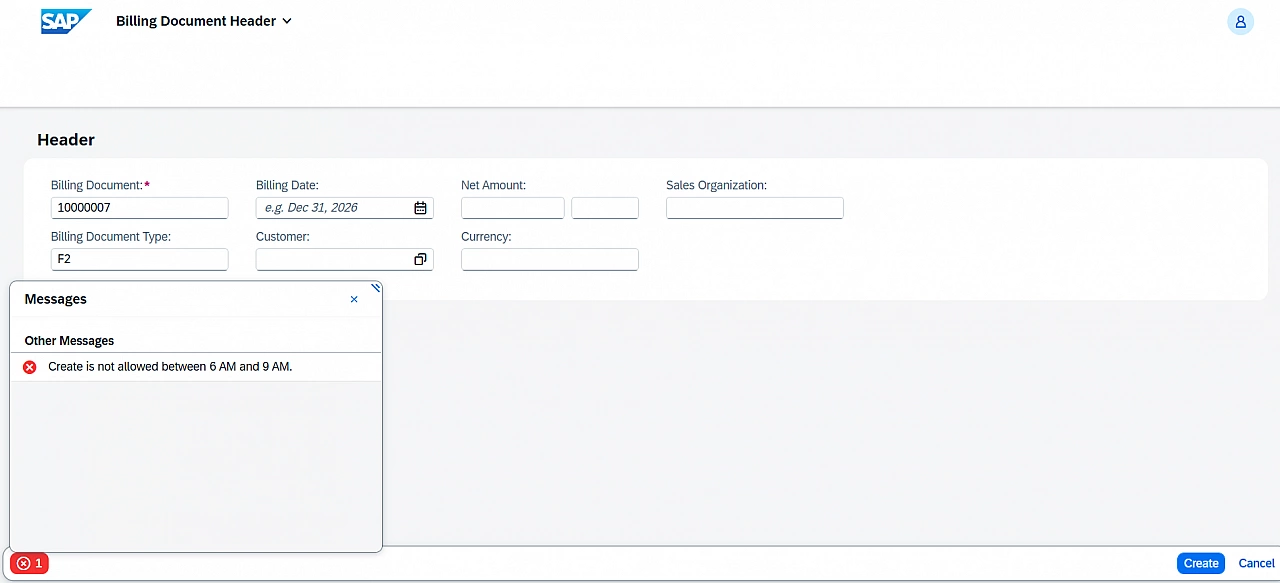
This affects all users and all requests equally.
What Just Happened
RAP did not change data.
RAP did not validate data.
It decided whether an operation should exist.
Static feature control defines permanent restrictions. Dynamic feature control decides behavior at runtime.
Instance feature control answers:
For this document, what is allowed?
Global feature control answers:
Right now in the system, what is allowed?
Thanks for reading.