

In our billing document application, after enabling draft, we noticed something important.
When we changed Material ID, the Description did not update immediately.
It only updated after clicking Save.
Why?
Because our determination was defined as:
determination determineItemDescription on save { create; }This runs in the save sequence.
So until Save is pressed, the UI does not reflect the new value.
But in a Fiori Elements application, users expect the description to change immediately when Material is changed.
This is where Side Effects come into the picture.
What Are Side Effects
Side effects inform the framework that when certain data changes, other parts of the business object must be refreshed on the UI.
Important:
Side effects do not contain business logic.
They only tell the UI:
If this changes, refresh that.
The actual calculation still happens in determinations.
Side effects only ensure the UI reflects those changes instantly.
Important Prerequisite
Side effects work only for draft-enabled business objects.
They operate during the transactional phase - not the save sequence.
So make sure draft is enabled in behavior definition and projection:
use draft;Adjusting Our Determination
Since we want immediate recalculation when MaterialId changes, the determination must run during modify.
determination determineItemDesc on modify { field MaterialId; }You can reuse the same logic used earlier to update Description.
Now the value updates in transactional buffer as soon as MaterialId changes.
But the UI still needs to be told to reload Description.
That is where side effects come in.
Syntax of Side Effects
Side effects are declared in the behavior definition.
General syntax:
side effects { field MyField affects Target; }

side effects { $self affects Targets; }

side effects { action MyAction affects Targets; }

side effects { determine action MyDetermineAction
               executed on sources
               affects Targets; }

side effects { event MyEvent affects Targets }

side effects { recommendation function MyRecommendedValuesFunction executed on Sources; }
The trigger can be:
-
field MyField -
$self -
action MyAction -
determine action ...
Targets Can Be
In the affects section, the following targets are possible:
-
$self
→ Reloads the current RAP BO instance -
entity _MyAssoc
→ Reloads associated entity -
permissions(field MyField/action MyAction)
→ Reloads feature and authorization control -
field
→ Reloads specific field -
message
→ Reloads messages returned in reported parameter
Multiple targets can be specified.
Implementing Side Effects in Our App
When MaterialId changes, Description must refresh.
So we write:
side effects { field MaterialId affects field Description; }Notice the direction carefully:
MaterialId is the trigger.
Description is the target.
Full behavior:
define behavior for ZSAC_I_BILL_ITEM
persistent table zsac_bill_item
draft table zsac_bill_item_d
lock dependent by _header
authorization dependent by _header
{
  update;
  delete;

  field ( readonly : update, mandatory : create ) ItemNo;
  field ( readonly ) BillId, Description;

  determination determineItemDescription on save { create; }
  determination determineItemDesc on modify { field MaterialId; }

  side effects { field MaterialId affects field Description; }

  association _Header { with draft; }
}
Exposing Side Effects in Projection
Side effects must also be exposed in behavior projection.
projection;
strict ( 2 );
use draft;
use side effects;
Just like use draft, the statement use side effects exposes all side effects from underlying BO entities.
Without this, UI will not react.
Restrictions of Side Effects
From SAP documentation, keep these points in mind:
1. Static Actions Cannot Be Used
Actions defined with static must not be used as:
-
Side effect trigger
-
Side effect target
Side effects are instance based and operate on entity data.
2. $self Trigger Limitation
If $self is used as trigger:
side effects { $self affects field Description; }The target cannot be a field of the same entity using $self.
Instead, you should target associated entities, for example:
side effects { $self affects field _Item.Description; }3. Only One Side Effects Block Per Entity
Side effects can be specified exactly once per RAP BO entity.
If written twice, it results in syntax error.
Multiple definitions must be grouped:
side effects {
    $self affects field _Item.Description;
    field SalesOrg affects field _Item.MaterialId;
}
4. UI Scope
Side effects are primarily relevant for UI scenarios.
They:
-
Do not execute business logic
-
Do not commit data
-
Only refresh affected parts in draft transactional phase
What Happens Now
When user edits Material ID:
-
Determination runs on modify
-
Description updated in transactional buffer
-
Side effect triggers UI refresh
-
Description updates instantly
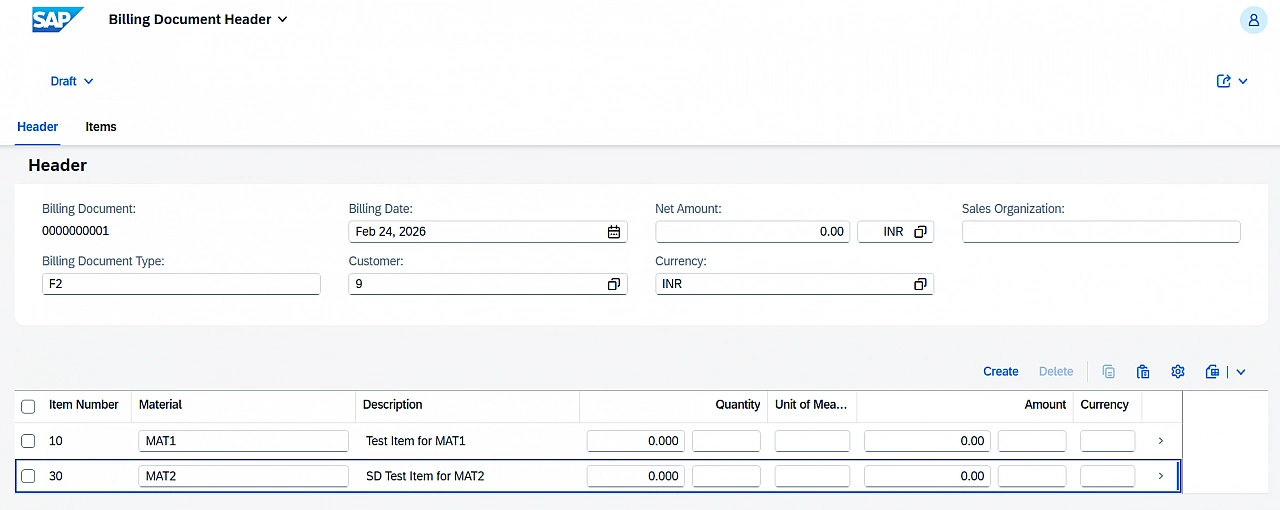
No Save required.
Thanks for reading.