
In the previous blogs of this SAP RAP series, we built multiple managed applications where the framework handled persistence automatically.
Now let’s build something different.
In this blog, we will create a simple unmanaged RAP application where:
-
We manually handle CRUD logic
-
We manage database persistence ourselves
-
We understand modify phase and save sequence
-
We launch the app as a Fiori Elements List Report
This is a non-draft unmanaged example, focused purely on CRUD.
Naming Convention Used in This Blog
For all objects in this blog, use your own namespace prefix such as:
-
ZXXX_T_CUSTOMER- For Database Table -
ZXXX_R_CUSTOMER- For Root Interface View -
ZXXX_C_CUSTOMER- For Projection View -
ZXXX_SD_CUSTOMER- For Service Definition -
ZXXX_UI_CUSTOMER_V2- For Service Binding
In my system, I have used the prefix ZSAC_. You can replace it with your own prefix accordingly.
What We Are Building
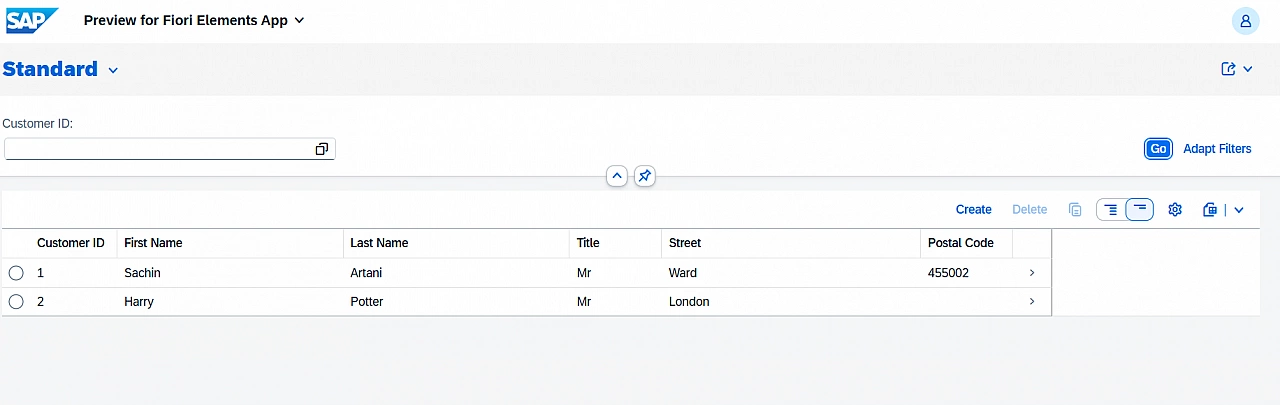
We will build a simple Customer application.
The app will provide:
-
List Report showing customers with functionality to create new customers
-
Object Page for update and delete
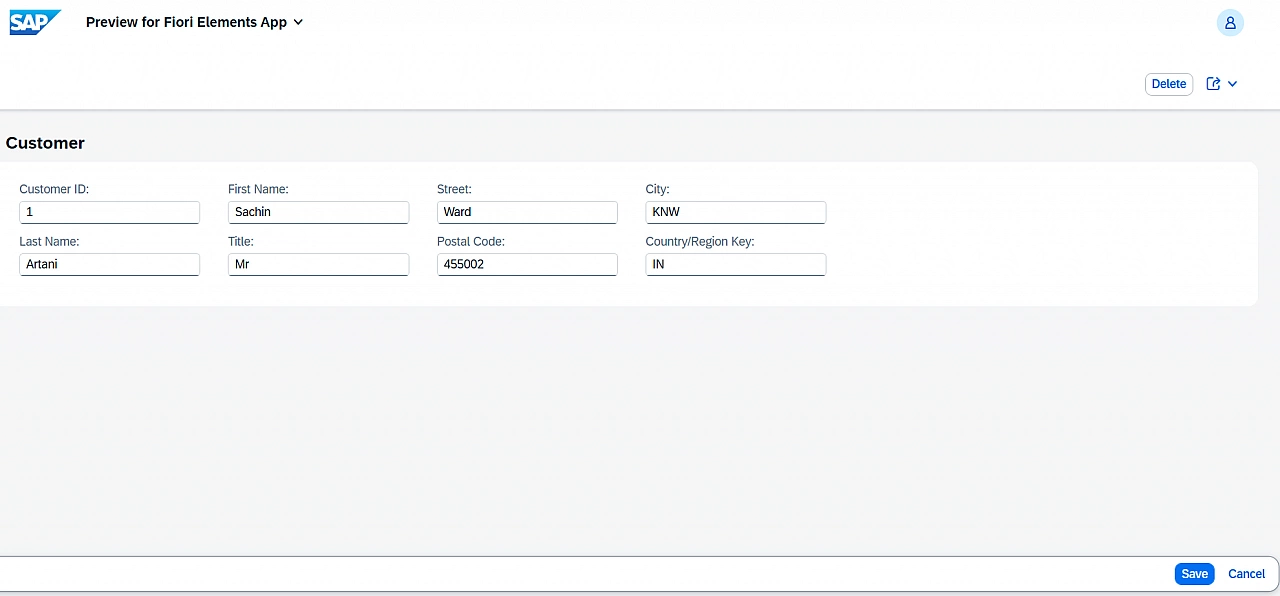
All database operations will be handled manually.
Step 1 – Create Database Table
Create transparent table ZSAC_T_CUSTOMER.
@EndUserText.label : 'Customer Data'
@AbapCatalog.enhancement.category : #NOT_EXTENSIBLE
@AbapCatalog.tableCategory : #TRANSPARENT
@AbapCatalog.deliveryClass : #A
@AbapCatalog.dataMaintenance : #RESTRICTED
define table zsac_t_customer {

  key client     : abap.clnt not null;
  key customerid : /dmo/customer_id not null;
  firstname      : /dmo/first_name;
  lastname       : /dmo/last_name;
  title          : /dmo/title;
  street         : /dmo/street;
  postalcode     : /dmo/postal_code;
  city           : /dmo/city;
  countrycode    : land1;

}
Step 2 – Root Interface View
ZSAC_R_CUSTOMER.@AccessControl.authorizationCheck: #NOT_REQUIRED
@EndUserText.label: 'Customer interface view'
@Metadata.ignorePropagatedAnnotations: true
define root view entity Zsac_R_Customer
as select from zsac_t_customer
{
key customerid as Customerid,
firstname as Firstname,
lastname as Lastname,
title as Title,
street as Street,
postalcode as Postalcode,
city as City,
countrycode as Countrycode
}Step 3 – Projection View
Create root projection viewZSAC_C_CUSTOMER.
@AccessControl.authorizationCheck: #NOT_REQUIRED
@EndUserText.label: 'Projection view'
@Metadata.ignorePropagatedAnnotations: true
@Metadata.allowExtensions: true
define root view entity zsac_c_customer
  provider contract transactional_query
  as projection on Zsac_R_Customer
{
  key Customerid,
      Firstname,
      Lastname,
      Title,
      Street,
      Postalcode,
      City,
      Countrycode
}
Step 4 – Metadata Extension
Create metadata extension ZSAC_C_CUSTOMER_ME. This defines List Report columns and Object Page layout.
@Metadata.layer: #CORE
annotate entity zsac_c_customer
with
{
    @UI.facet: [{ id: 'Customer',
                  position: 10,
                  label: 'Customer',
                  purpose: #STANDARD,
                  type: #IDENTIFICATION_REFERENCE }]

    @UI: {  lineItem: [{ position: 10 }],
            identification: [{ position: 10 }],
            selectionField: [{ position: 10 }] }
    Customerid;

    @UI: {  lineItem: [{ position: 20 }],
            identification: [{ position: 30 }] }
    Firstname;

    @UI: {  lineItem: [{ position: 30 }],
            identification: [{ position: 30 }] }
    Lastname;

    @UI: {  lineItem: [{ position: 40 }],
            identification: [{ position: 40 }] }
    Title;

    @UI: {  lineItem: [{ position: 50 }],
            identification: [{ position: 50 }] }
    Street;

    @UI: {  lineItem: [{ position: 60 }],
            identification: [{ position: 60 }] }
    Postalcode;

    @UI: {  lineItem: [{ position: 70 }],
            identification: [{ position: 70 }] }
    City;

    @UI: {  lineItem: [{ position: 80 }],
            identification: [{ position: 80 }] }
    Countrycode;
}
Step 5 – Behavior Definition (Unmanaged)
unmanaged implementation in class zbp_sac_r_customer unique;
strict ( 2 );

define behavior for ZSAC_R_Customer
lock master
authorization master ( instance )
{
  create ( authorization : global );
  update;
  delete;
}
Important Points
1. unmanaged implementation
This tells RAP:
The framework will not handle persistence.
The developer must implement:
-
CREATE
-
UPDATE
-
DELETE
-
READ
manually inside the behavior implementation class.
In managed RAP, the framework automatically performs database operations. In unmanaged RAP, full control lies with the developer.
2. Why CustomerId is Not Read Only?
Since, we have not implemented any numbering on key field CustomerId:
-
We must allow the user to provide
CustomerIdduring create. -
If we mark the key as
readonly, the create operation would fail.
So we intentionally keep the key editable.
3. Authorization
We declared: authorization master ( instance )
Authorization works the same way as managed RAP. In this blog, we focus only on CRUD lifecycle.
Understanding Unmanaged Lifecycle
Unmanaged RAP separates logic into:
-
Transactional Phase - CREATE, UPDATE and DELETE methods are implemented here
-
Save Sequence Phase - Actual database operations must happen here
This separation ensures transactional consistency.
Behavior Implementation Class
To pass data from local handler class to local saver class, we define a local buffer class:
CLASS lcl_data_buffer DEFINITION.
  PUBLIC SECTION.
    CLASS-DATA gt_create TYPE TABLE OF zsac_s_customer.
    CLASS-DATA gt_update TYPE TABLE OF zsac_s_customer.
    CLASS-DATA gt_delete TYPE TABLE OF zsac_s_customer.
ENDCLASS.
Methods in the local handler class (Create, Update and Delete) do not write directly to database. They only collect changes into buffer tables.
The save method then persists those changes in one transactional step in the local saver class.
This ensures:
-
Framework lifecycle is respected
-
Validations can run before save
-
Rollback works correctly
Behavior Implementation Class
Here is the complete code of Behavior Implementation Class-
CLASS lcl_data_buffer DEFINITION.
  PUBLIC SECTION.
    CLASS-DATA gt_create TYPE TABLE OF zsac_s_customer.
    CLASS-DATA gt_update TYPE TABLE OF zsac_s_customer.
    CLASS-DATA gt_delete TYPE TABLE OF zsac_s_customer.
ENDCLASS.

CLASS lhc_Zsac_R_Customer DEFINITION INHERITING FROM cl_abap_behavior_handler.
  PRIVATE SECTION.

    METHODS get_instance_authorizations FOR INSTANCE AUTHORIZATION
      IMPORTING keys REQUEST requested_authorizations FOR Zsac_R_Customer RESULT result.

    METHODS get_global_authorizations FOR GLOBAL AUTHORIZATION
      IMPORTING REQUEST requested_authorizations FOR Zsac_R_Customer RESULT result.

    METHODS create FOR MODIFY
      IMPORTING entities FOR CREATE Zsac_R_Customer.

    METHODS update FOR MODIFY
      IMPORTING entities FOR UPDATE Zsac_R_Customer.

    METHODS delete FOR MODIFY
      IMPORTING keys FOR DELETE Zsac_R_Customer.

    METHODS read FOR READ
      IMPORTING keys FOR READ Zsac_R_Customer RESULT result.

    METHODS lock FOR LOCK
      IMPORTING keys FOR LOCK Zsac_R_Customer.

ENDCLASS.

CLASS lhc_Zsac_R_Customer IMPLEMENTATION.

  METHOD get_instance_authorizations.
  ENDMETHOD.

  METHOD get_global_authorizations.
  ENDMETHOD.

  METHOD create.
    lcl_data_buffer=>gt_create = CORRESPONDING #( entities ).
  ENDMETHOD.

  METHOD update.

    DATA ls_customer TYPE zsac_s_customer.

    SELECT * FROM zsac_t_customer
      FOR ALL ENTRIES IN @entities
      WHERE customerid = @entities-customerid
      INTO TABLE @DATA(lt_existing_customers).

    IF lt_existing_customers IS NOT INITIAL.

      LOOP AT entities INTO DATA(ls_entity).

        ls_customer =
          CORRESPONDING #( lt_existing_customers[ customerid = ls_entity-customerid ] ).

        IF ls_entity-%control-firstname = if_abap_behv=>mk-on.
          ls_customer-firstname = ls_entity-firstname.
        ENDIF.

        IF ls_entity-%control-lastname = if_abap_behv=>mk-on.
          ls_customer-lastname = ls_entity-lastname.
        ENDIF.

        IF ls_entity-%control-title = if_abap_behv=>mk-on.
          ls_customer-title = ls_entity-title.
        ENDIF.

        IF ls_entity-%control-street = if_abap_behv=>mk-on.
          ls_customer-street = ls_entity-street.
        ENDIF.

        IF ls_entity-%control-postalcode = if_abap_behv=>mk-on.
          ls_customer-postalcode = ls_entity-postalcode.
        ENDIF.

        IF ls_entity-%control-city = if_abap_behv=>mk-on.
          ls_customer-city = ls_entity-city.
        ENDIF.

        IF ls_entity-%control-countrycode = if_abap_behv=>mk-on.
          ls_customer-countrycode = ls_entity-countrycode.
        ENDIF.

        INSERT ls_customer INTO TABLE lcl_data_buffer=>gt_update.

      ENDLOOP.

    ENDIF.

  ENDMETHOD.

  METHOD delete.
    lcl_data_buffer=>gt_delete = CORRESPONDING #( keys ).
  ENDMETHOD.

  METHOD read.
  ENDMETHOD.

  METHOD lock.
  ENDMETHOD.

ENDCLASS.

CLASS lsc_ZSAC_R_CUSTOMER DEFINITION INHERITING FROM cl_abap_behavior_saver.
  PROTECTED SECTION.
    METHODS finalize REDEFINITION.
    METHODS check_before_save REDEFINITION.
    METHODS save REDEFINITION.
    METHODS cleanup REDEFINITION.
    METHODS cleanup_finalize REDEFINITION.
ENDCLASS.

CLASS lsc_ZSAC_R_CUSTOMER IMPLEMENTATION.

  METHOD finalize.
  ENDMETHOD.

  METHOD check_before_save.
  ENDMETHOD.

  METHOD save.

    DATA: lt_create_db TYPE TABLE OF zsac_t_customer,
          lt_update_db TYPE TABLE OF zsac_t_customer,
          lt_delete_db TYPE TABLE OF zsac_t_customer.

    IF lcl_data_buffer=>gt_create IS NOT INITIAL.

      lt_create_db = CORRESPONDING #( lcl_data_buffer=>gt_create ).
      INSERT zsac_t_customer FROM TABLE @lt_create_db.

    ELSEIF lcl_data_buffer=>gt_update IS NOT INITIAL.

      lt_update_db = CORRESPONDING #( lcl_data_buffer=>gt_update ).
      MODIFY zsac_t_customer FROM TABLE @lt_update_db.

    ELSEIF lcl_data_buffer=>gt_delete IS NOT INITIAL.

      lt_delete_db = CORRESPONDING #( lcl_data_buffer=>gt_delete ).
      DELETE zsac_t_customer FROM TABLE @lt_delete_db.

    ENDIF.

  ENDMETHOD.

  METHOD cleanup.
  ENDMETHOD.

  METHOD cleanup_finalize.
  ENDMETHOD.

ENDCLASS.
Understanding %control in Update
During update, RAP provides control information: ls_entity-%control-fieldname
This tells us which fields were actually modified.
If %control-firstname = if_abap_behv=>mk-on, then the field was changed.
Without this check, we might overwrite unchanged fields accidentally. Therefore, %control handling is critical in unmanaged update logic.
Why Database Operations Happen in Save
RAP lifecycle:
-
Handler class methods collect requested changes
-
Framework processes validations
-
Save sequence persists the changes
If we perform INSERT or MODIFY inside create/update methods:
-
We bypass RAP lifecycle
-
Transaction consistency may break
-
Rollback may not work properly
That is why database operations must be implemented in save.
Behavior Projection
projection;
strict ( 2 );

define behavior for zsac_c_customer
{
  use create;
  use update;
  use delete;
}
Service Definition
@EndUserText.label: 'Service Definition for Customer'
define service ZSAC_SD_Customer {
  expose zsac_c_customer as Customer;
}
Service Binding
Create service binding:
-
Name: ZSAC_UI_CUSTOMER_V2
-
Binding type: OData V2 – UI
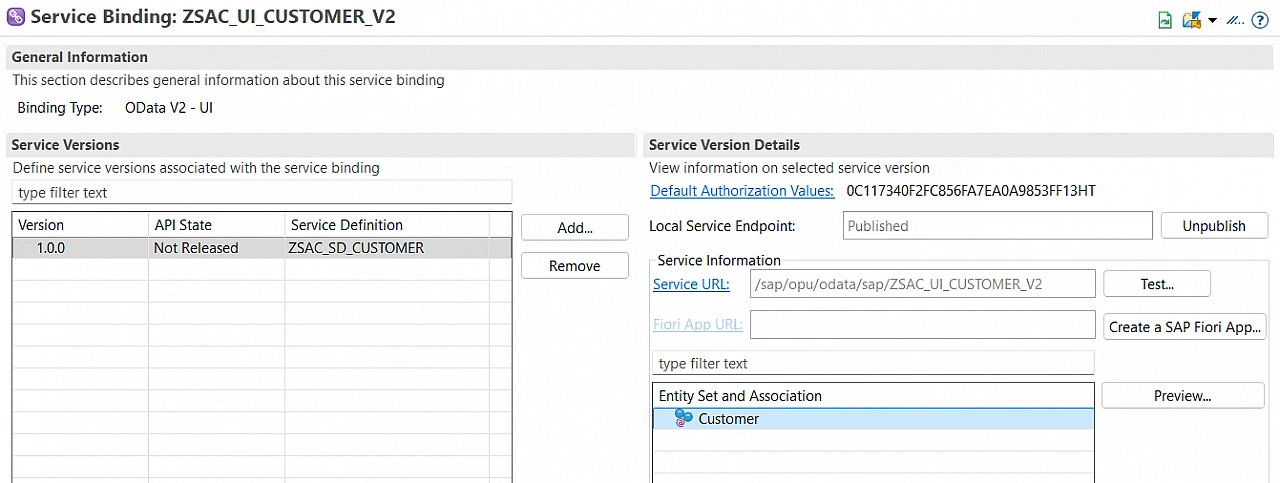
Publish and launch preview.
You will see working List Report and Object Page.
Thanks for reading.