
With the introduction of RAP, ABAP development is gradually moving away from the SAP GUI toward ADT. The goal is to keep development clean, stable, modular, organized, and future-ready.
So far, in S/4HANA on-premise and private cloud systems, we still rely heavily on the SAP GUI to create database tables and other DDIC objects, even when building RAP applications. That is mostly a force of habit. However, this is expected to change in the near future, as more and more classic objects are now getting modern replacements.
With release 2502 in SAP BTP ABAP Environment or S/4HANA Public Cloud, CDS Table Entities were introduced as a replacement for classic DDIC database tables. Since table fields traditionally depend on data elements and domains, their modern counterparts were also introduced earlier:
-
CDS Simple Types in S/4HANA 2305
-
CDS Enumerated Types (Enums) in S/4HANA 2308
Although these objects are still evolving and have some gaps at the moment, they clearly represent the future direction of ABAP data modeling.
What Is a CDS Table Entity?
A CDS Table Entity defines a database table directly in ABAP CDS as an ABAP-managed database object. It provides a persistence layer for ABAP applications and allows you to define and manage SAP HANA database tables as native CDS repository objects.
CDS table entities support:
-
Relationship modeling using CDS associations
-
Semantic metadata using CDS annotations
-
Strong typing using CDS simple types and CDS enumerated types
You can read more about CDS table entities here.
Scenario: Billing Document App Using CDS Table Entity
In this blog, we will rebuild the Billing Document RAP application that we developed earlier.
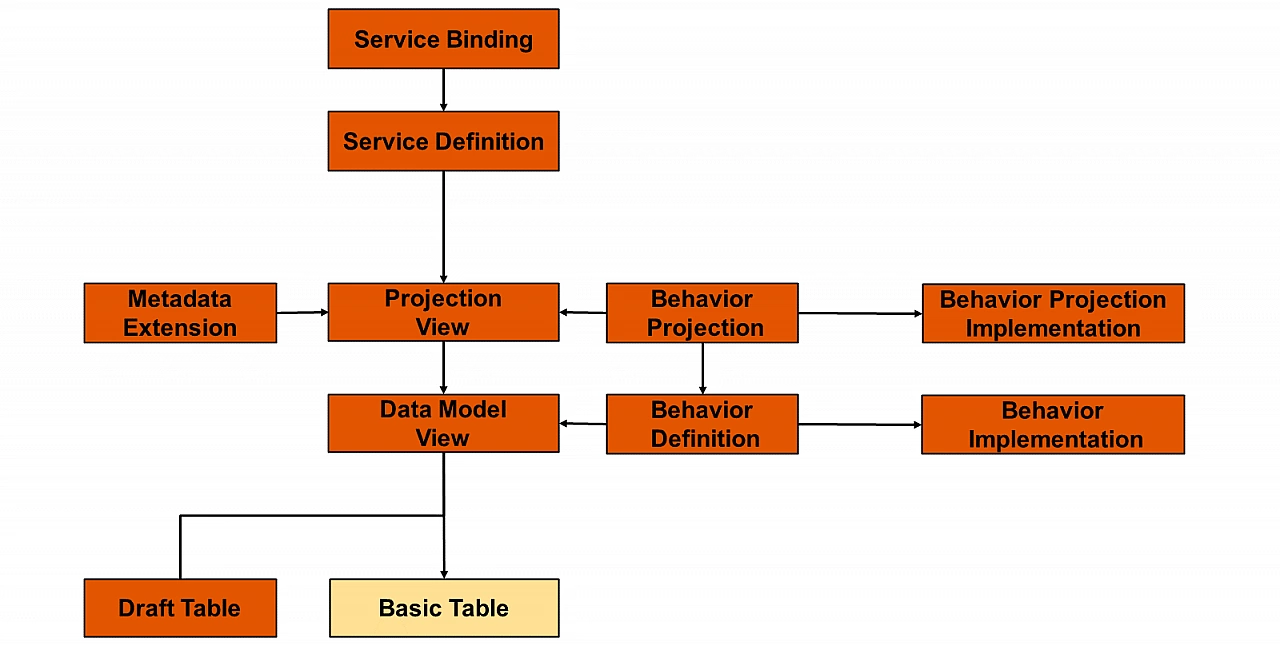
In the earlier blog, we created the following objects to build a CRUD-enabled managed RAP application:
What Changes with CDS Table Entity?
When using CDS Table Entities, we replace:
-
The basic database table
-
The data model CDS view (CDS View Entity)
with a single object: the CDS Table Entity.
All other RAP artifacts remain unchanged.
To understand CDS Simple Types better, we will first create a few simple types and then use them inside our CDS table entities.
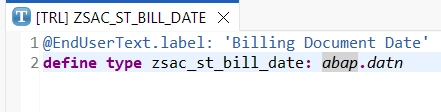
Step 1: Create a CDS Simple Type
Right-click on the package
→ Choose Other ABAP Repository Objects
→ Select Type under Data Definition
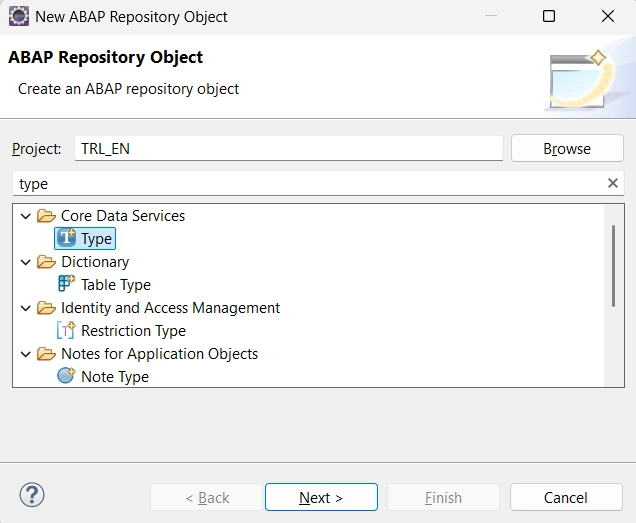
Provide the name ZXXX_ST_BILL_DATE, where XXX represents your initials.
In my case, I am using:
-
Name:
ZSAC_ST_BILL_DATE -
Description: Billing Document Date
Select the template defineType.
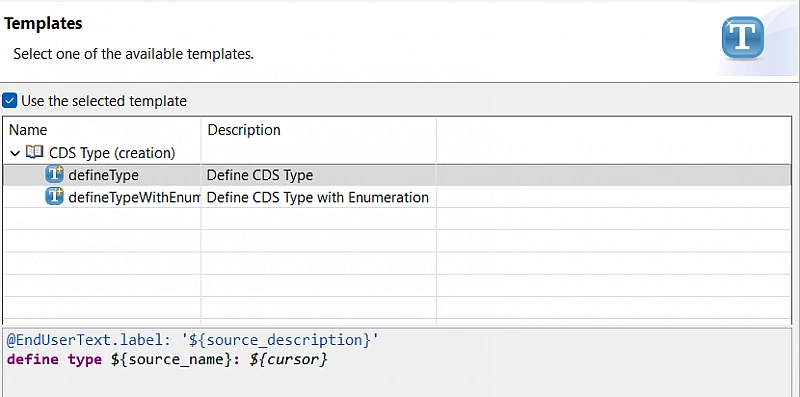
Click Finish.
Once the object opens, define the primitive data type or reference a data element, then save and activate the type.
Step 2: Create CDS Table Entities
Right-click on the package
→ Choose Other ABAP Repository Objects
→ Select Data Definition under Core Data Services
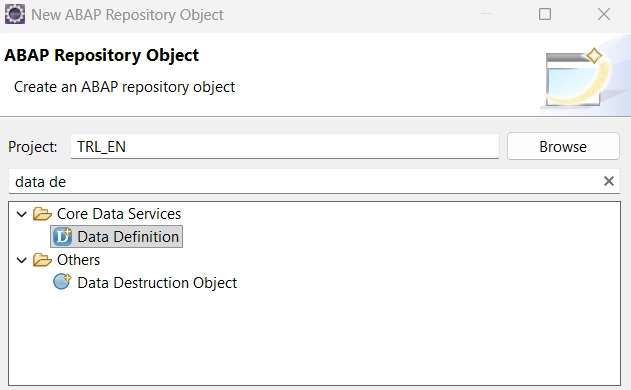
Create a data definition with the name ZXXX_R_BILLING_HEADER, where XXX represents your initials.
In my case, I am using ZSAC_R_BILLING_HEADER.
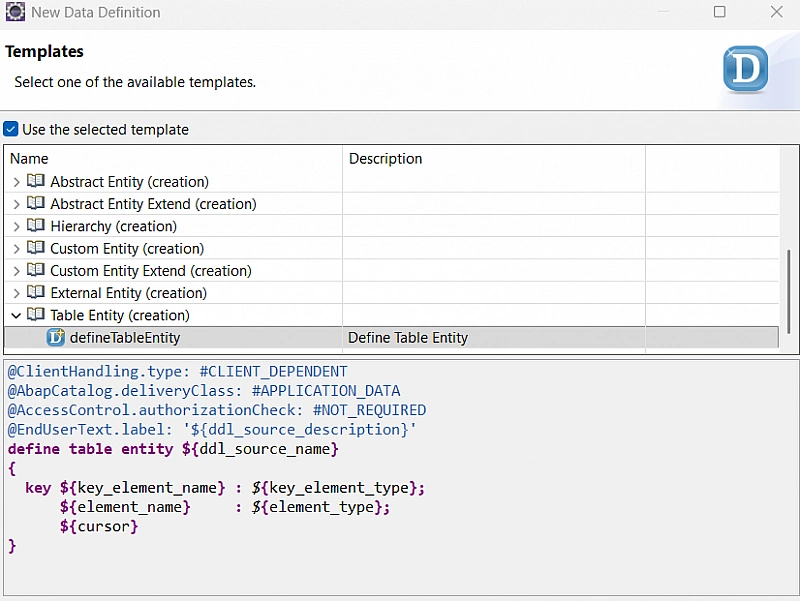
At this point, I assume you already have clarity on how parent-child related CDS objects are modeled in RAP. Keeping that in mind, copy the following definition for the Billing Document Header table entity:
@ClientHandling.type: #CLIENT_DEPENDENT
@AbapCatalog.deliveryClass: #APPLICATION_DATA
@AccessControl.authorizationCheck: #NOT_REQUIRED
@EndUserText.label: 'Billing Document Header'
define root table entity zsac_r_billing_header
{
  key bill_id            : abap.numc(10);
      bill_type          : abap.char(4);
      bill_date          : zsac_st_bill_date;
      customer_id        : kunnr;
      @Semantics.amount.currencyCode : 'currency'
      net_amount         : zsac_st_net_amount;
      currency           : waers;
      sales_org          : vkorg;
      @Semantics.user.createdBy: true
      createdby          : syuname;
      @Semantics.systemDateTime.createdAt: true
      createdat          : timestamp;
      @Semantics.user.lastChangedBy: true
      lastchangedby      : syuname;
      @Semantics.systemDateTime.lastChangedAt: true
      lastchangedat      : timestamp;
      @Semantics.systemDateTime.localInstanceLastChangedAt: true
      locallastchangedat : timestamp;

      _BillingDocumentItem :
        composition of exact one to many zsac_i_billing_item;
}
Note: Likewise, you can choose to create CDS Simple Types for more fields (as shown above), or you may directly use primitive ABAP data types or existing data elements, depending on your use case and modeling preference.
Since the Billing Document Item table entity does not exist yet, do not activate this object at this stage.
Why did we specify the root keyword here? I want you to figure that out yourself.
Create CDS Table Entity for Billing Document Item
Now create the CDS table entity for the billing document item using the code below.
Make sure to name the object ZXXX_I_BILLING_ITEM, where XXX represents your initials.
@ClientHandling.type: #CLIENT_DEPENDENT
@AbapCatalog.deliveryClass: #APPLICATION_DATA
@AccessControl.authorizationCheck: #NOT_REQUIRED
@EndUserText.label: 'Billing Document Item'
define table entity zsac_i_billing_item
{
  key bill_id            : zsac_st_bill_id;
  key item_no            : zsac_st_bill_item_no;
      material_id        : matnr;
      description        : abap.char(40);
      @Semantics.quantity.unitOfMeasure : 'uom'
      quantity           : abap.quan(13,3);
      @Semantics.amount.currencyCode : 'currency'
      item_amount        : abap.curr(15,2);
      currency           : waers;
      uom                : meins;
      @Semantics.user.createdBy: true
      createdby          : syuname;
      @Semantics.systemDateTime.createdAt: true
      createdat          : timestamp;
      @Semantics.user.lastChangedBy: true
      lastchangedby      : syuname;
      @Semantics.systemDateTime.lastChangedAt: true
      lastchangedat      : timestamp;
      @Semantics.systemDateTime.localInstanceLastChangedAt: true
      locallastchangedat : timestamp;

      _BillingDocumentHeader :
        association to parent zsac_r_billing_header
          on _BillingDocumentHeader.bill_id = $projection.bill_id;
}
Now activate both the objects together.
Once they are activated successfully, the rest of the steps remain exactly the same as what we did in the basic Billing Document RAP application.
So, go ahead and create the following objects by copying the code and renaming the objects using your initials.
Step 3: Create Projection Views
Billing Document Header Projection
Create the projection view ZXXX_C_BILLING_HEADER.
In my case, the object name is ZSAC_C_BILLING_HEADER.
@AccessControl.authorizationCheck: #NOT_REQUIRED
@EndUserText.label: 'Billing Document Header Projection'
@Metadata.allowExtensions: true
define root view entity zsac_c_billing_header
  provider contract transactional_query
  as projection on zsac_r_billing_header
{
  key bill_id,
      bill_type,
      bill_date,
      customer_id,
      net_amount,
      currency,
      sales_org,
      createdby,
      createdat,
      lastchangedby,
      lastchangedat,
      locallastchangedat,

      _BillingDocumentItem: redirected to composition child zsac_c_billing_item
}
Billing Document Item Projection
Create the projection view ZXXX_C_BILLING_ITEM.
In my case, the object name is ZSAC_C_BILLING_ITEM.
@AccessControl.authorizationCheck: #NOT_REQUIRED
@EndUserText.label: 'Billing Document Item Projection'
@Metadata.allowExtensions: true
define view entity zsac_c_billing_item
  as projection on zsac_i_billing_item
{
  key bill_id,
  key item_no,
      material_id,
      description,
      quantity,
      item_amount,
      currency,
      uom,
      createdby,
      createdat,
      lastchangedby,
      lastchangedat,
      locallastchangedat,

      /* Associations */
      _BillingDocumentHeader : redirected to parent zsac_c_billing_header
}
Activate them together.
Step 4: Create Metadata Extensions
Billing Document Header Metadata Extension
Create and activate the metadata extension for ZXXX_C_BILLING_HEADER.
@Metadata.layer: #CORE
@UI: { headerInfo: { typeName: 'Billing Document Header',
                     typeNamePlural: 'Billing Documents',
                     title: { type: #STANDARD, label: 'Billing Document', value: 'bill_id' }
                   }
      }
annotate entity zsac_c_billing_header with
{
  @UI.facet: [
    {
      id      : 'Header',
      type    : #IDENTIFICATION_REFERENCE,
      label   : 'Billing Document Header',
      purpose : #STANDARD,
      position: 10
    },
    {
      id            : 'Item',
      type          : #LINEITEM_REFERENCE,
      label         : 'Billing Document Items',
      purpose       : #STANDARD,
      targetElement : '_BillingDocumentItem',
      position      : 20
    }
  ]

  @UI: {
    lineItem:       [ { position: 10, label: 'Billing Document' } ],
    identification: [ { position: 10, label: 'Billing Document' } ],
    selectionField: [ { position: 10 } ]
  }
  bill_id;

  @UI: {
    lineItem:       [ { position: 20, label: 'Billing Type' } ],
    identification: [ { position: 20, label: 'Billing Type' } ],
    selectionField: [ { position: 20 } ]
  }
  bill_type;

  @UI: {
    lineItem:       [ { position: 30, label: 'Billing Date' } ],
    identification: [ { position: 30, label: 'Billing Date' } ]
  }
  bill_date;

  @UI: {
    lineItem:       [ { position: 40, label: 'Customer ID' } ],
    identification: [ { position: 40, label: 'Customer ID' } ],
    selectionField: [ { position: 30 } ]
  }
  customer_id;

  @UI: {
    lineItem:       [ { position: 50, label: 'Net Amount' } ],
    identification: [ { position: 50, label: 'Net Amount' } ]
  }
  net_amount;

  @UI: {
    lineItem:       [ { position: 60, label: 'Currency' } ],
    identification: [ { position: 60, label: 'Currency' } ]
  }
  currency;

  @UI: {
    lineItem:       [ { position: 70, label: 'Sales Organization' } ],
    identification: [ { position: 70, label: 'Sales Organization' } ]
  }
  sales_org;

  @UI: {
    identification: [ { position: 80, label: 'Created By' } ]
  }
  createdby;

  @UI: {
    identification: [ { position: 90, label: 'Created At' } ]
  }
  createdat;

  @UI: {
    identification: [ { position: 100, label: 'Last Changed By' } ]
  }
  lastchangedby;

  @UI: {
    identification: [ { position: 110, label: 'Last Changed At' } ]
  }
  lastchangedat;

  @UI: {
    identification: [ { position: 120, label: 'Local Last Changed At' } ]
  }
  locallastchangedat;
}
Billing Document Item Metadata Extension
Create and activate the metadata extension for ZXXX_C_BILLING_ITEM.
@Metadata.layer: #CORE
@UI: { headerInfo: { typeName: 'Billing Document Item',
                     typeNamePlural: 'Billing Documents',
                     title: { type: #STANDARD, label: 'Billing Document', value: 'bill_id' },
                     description: { type: #STANDARD, label: 'Item', value: 'item_no' }
                   }
      }
annotate entity zsac_c_billing_item
  with
{
  @UI.facet: [
    {
      id      : 'Item',
      type    : #IDENTIFICATION_REFERENCE,
      label   : 'Billing Document Item',
      purpose : #STANDARD
    }
  ]

  @UI: {
    lineItem:       [ { position: 10, label: 'Billing Document' } ],
    identification: [ { position: 10, label: 'Billing Document' } ]
  }
  bill_id;

  @UI: {
    lineItem:       [ { position: 20, label: 'Item Number' } ],
    identification: [ { position: 20, label: 'Item Number' } ]
  }
  item_no;

  @UI: {
    lineItem:       [ { position: 30, label: 'Material' } ],
    identification: [ { position: 30, label: 'Material' } ]
  }
  material_id;

  @UI: {
    lineItem:       [ { position: 40, label: 'Description' } ],
    identification: [ { position: 40, label: 'Description' } ]
  }
  description;

  @UI: {
    lineItem:       [ { position: 50, label: 'Quantity' } ],
    identification: [ { position: 50, label: 'Quantity' } ]
  }
  quantity;

  @UI: {
    lineItem:       [ { position: 60, label: 'Item Amount' } ],
    identification: [ { position: 60, label: 'Item Amount' } ]
  }
  item_amount;

  @UI: {
    lineItem:       [ { position: 70, label: 'Currency' } ],
    identification: [ { position: 70, label: 'Currency' } ]
  }
  currency;

  @UI: {
    lineItem:       [ { position: 80, label: 'Unit of Measure' } ],
    identification: [ { position: 80, label: 'Unit of Measure' } ]
  }
  uom;

  @UI: {
    identification: [ { position: 90, label: 'Created By' } ]
  }
  createdby;

  @UI: {
    identification: [ { position: 100, label: 'Created At' } ]
  }
  createdat;

  @UI: {
    identification: [ { position: 110, label: 'Last Changed By' } ]
  }
  lastchangedby;

  @UI: {
    identification: [ { position: 120, label: 'Last Changed At' } ]
  }
  lastchangedat;

  @UI: {
    identification: [ { position: 130, label: 'Local Last Changed At' } ]
  }
  locallastchangedat;
}
Step 5: Create and Activate Behavior Definition
Create a behavior definition with managed implementation on top of the root CDS table entity.
managed implementation in class zsac_cl_bp_billing_header unique;
strict ( 2 );

define behavior for zsac_r_billing_header alias BillingDocumentHeader
lock master
authorization master ( instance )
{
  create ( authorization : global );
  update;
  delete;
  field ( readonly ) createdat, createdby, lastchangedby, lastchangedat, locallastchangedat;
  association _BillingDocumentItem { create; }
}

define behavior for zsac_i_billing_item alias BillingDocumentItem
lock dependent by _BillingDocumentHeader
authorization dependent by _BillingDocumentHeader
{
  update;
  delete;
  field ( readonly ) bill_id, createdat, createdby, lastchangedby, lastchangedat, locallastchangedat;
  association _BillingDocumentHeader;
}
You may choose to create the behavior implementation class, although it is not mandatory for this scenario.
Step 6: Create and Activate Behavior Projection
Create the behavior projection on top of the CDS projection views.
projection;
strict ( 2 );

define behavior for zsac_c_billing_header alias BillingDocumentHeader
{
  use create;
  use update;
  use delete;

  use association _BillingDocumentItem { create; }
}

define behavior for zsac_c_billing_item alias BillingDocumentItem
{
  use update;
  use delete;

  use association _BillingDocumentHeader;
}
Step 7: Create Service Definition
Create a service definition ZSAC_UI_BILLINGDOC.
@EndUserText.label: 'Billing Document'
define service Zsac_ui_billingdoc {
  expose zsac_c_billing_header as BillingDocumentHeader;
  expose zsac_c_billing_item   as BillingDocumentItem;
}
Next, create a service binding named ZSAC_UI_BILLINGDOC_V2 with OData V2 as the binding type.
Activate and publish the service.
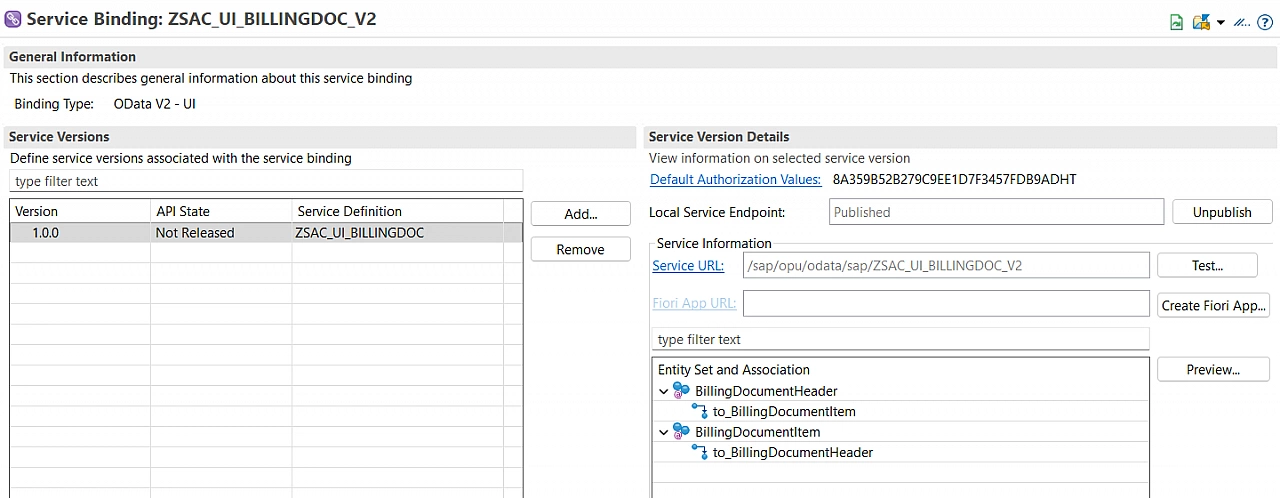
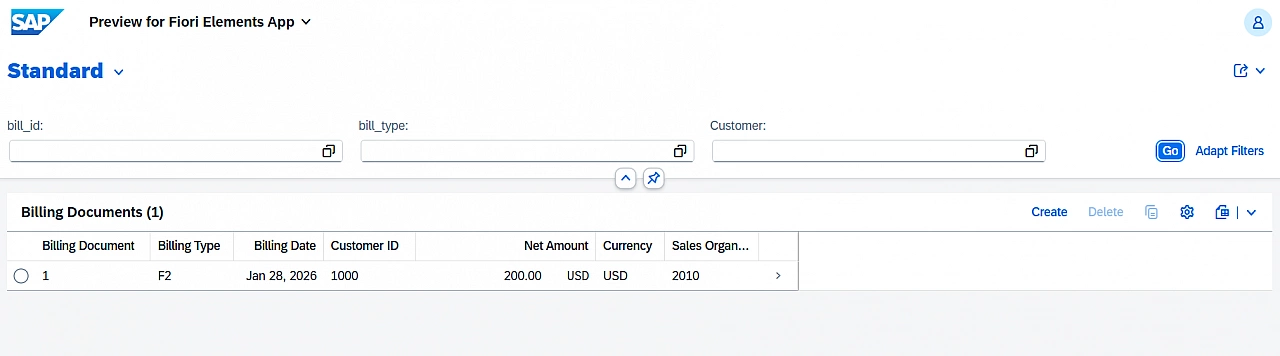
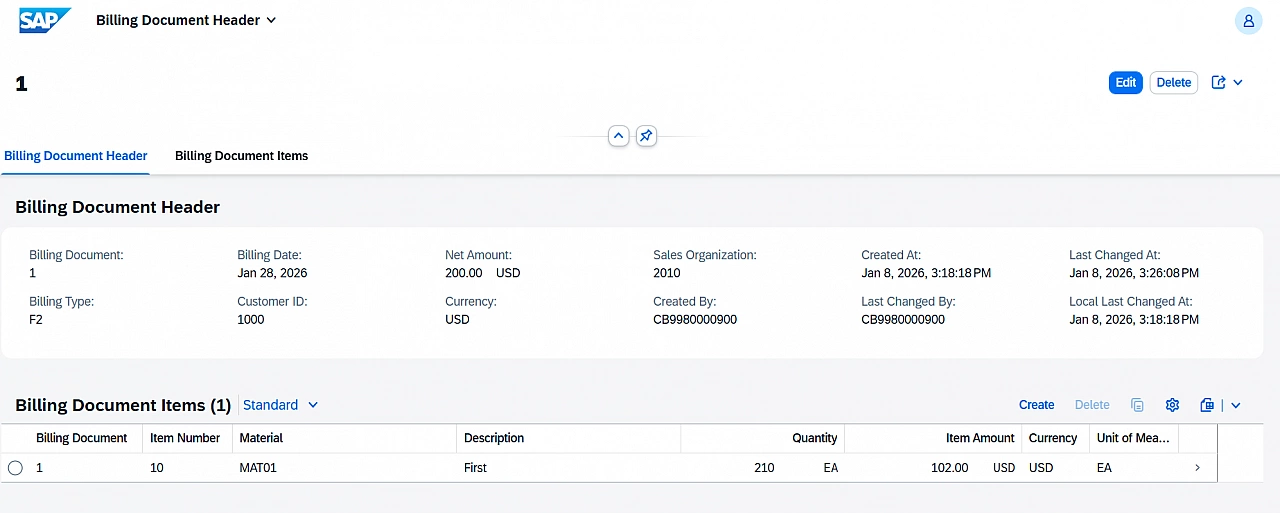
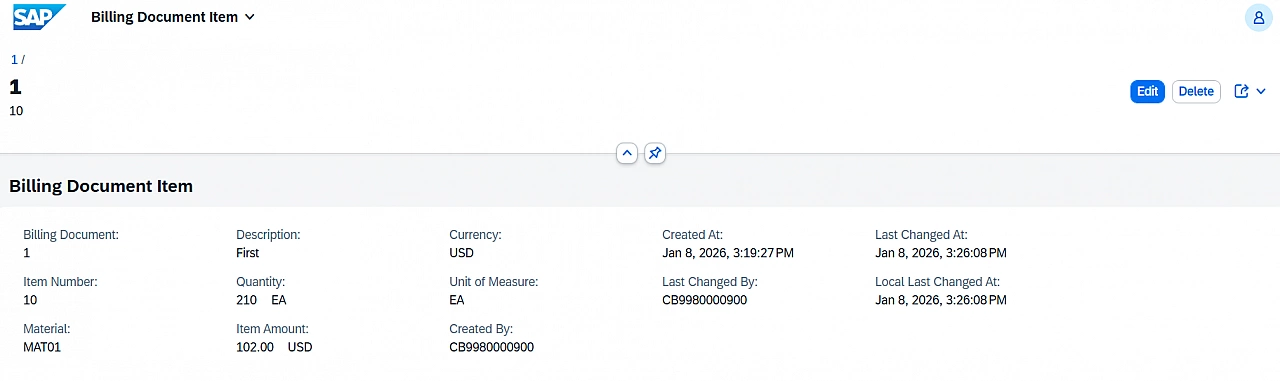
Now, test the application, as we have completed all the required steps.
Limitations of CDS Table Entities
There are several limitations and gaps that are yet to be addressed in future releases. CDS table entities are still evolving, and not all scenarios supported by classic DDIC tables are available today.
To understand some of these limitations in detail, you can refer to this detailed blog on CDS Table Entity.
How about making an unmanaged app using CDS Table Entities? It works.
How about enabling draft for this application? Let’s try that in the next blog. Stay tuned.