

So far we have seen how the state of an instance changes when we trigger an action. These were instance actions. We also saw that static actions can be used to create new instances.
However, static actions are not specifically meant for creating instances. They are general purpose operations that can perform any business logic.
So what should we use when the intention is specifically to create or copy RAP BO instances?
For that, RAP provides factory actions.
What are factory actions
Factory actions are used to create RAP BO entity instances. They are designed specifically for creation scenarios.
Factory actions can be instance bound or static.
Instance bound factory actions are typically used to create a new instance based on an existing one. For example, copying a document.
Static factory actions are used when the new instance does not depend on an existing instance. They can be used to create objects with predefined or default values.
Factory actions may also create child entity instances as part of the creation process.
In this blog, we will focus on an instance bound factory action that copies an existing Billing Document.
Since we want to expose the factory action to the UI, we will follow the same steps that we used for instance and static actions:
-
Define the action in the behavior definition
-
Implement the action in the behavior implementation class
-
Expose the action in the behavior projection
-
Expose the action at the UI level in the metadata extension
Let's start.
Step 1: Define the action in behavior definition
Define the factory action in the behavior definition as shown below:
factory action copyBillingDocument [1];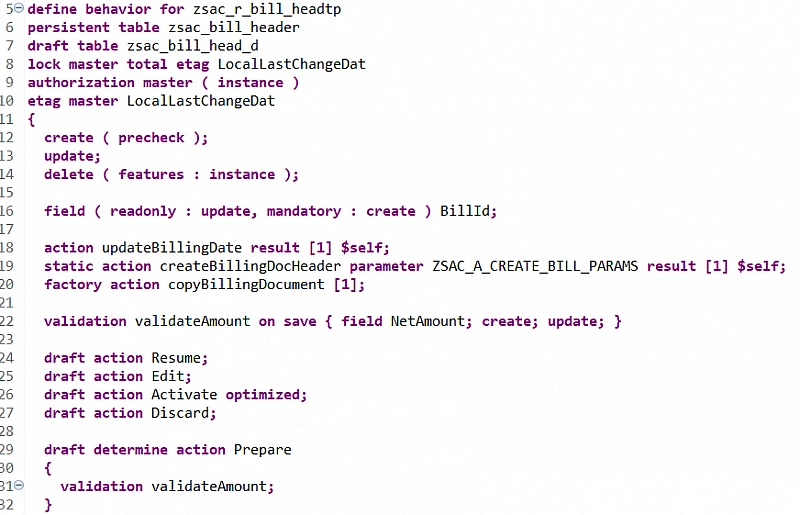
You may remember the [1]. We discussed earlier that it represents the cardinality of the returned instances.
In instance actions we define the cardinality along with the keywords result and $self to define the output parameter of action.
Factory actions work slightly differently. Since the purpose of a factory action is to create instances of the same BO, RAP implicitly assumes that the result will be $self. Therefore we only specify the cardinality.
The [1] means the action will create exactly one new instance.
Step 2: Implement action in behavior implementation class
As soon as we define the factory action in the BDEF, ADT provides a quick fix to implement the action method. Once generated, we can write our business logic in the behavior implementation class.
Below is the sample logic to copy the instance.
DATA: lt_billingdocuments TYPE TABLE FOR CREATE ZSAC_I_BILL_HEADER\\ZSAC_I_BILL_HEADER,
      lv_billingdoc       TYPE c LENGTH 10.

" Get highest existing Billing Document ID
SELECT FROM ZSAC_I_BILL_HEADER
  FIELDS MAX( BillId )
  INTO @lv_billingdoc.

" Generate next Billing Document ID
lv_billingdoc = lv_billingdoc + 1.

" Read source Billing Document(s) to copy
READ ENTITIES OF ZSAC_I_BILL_HEADER IN LOCAL MODE
  ENTITY ZSAC_I_BILL_HEADER
  ALL FIELDS WITH CORRESPONDING #( keys )
  RESULT DATA(lt_billdoc).

LOOP AT lt_billdoc ASSIGNING FIELD-SYMBOL().

  " Prepare data for new Billing Document
  APPEND VALUE #(
      %cid      = keys[ KEY entity %key = -%key ]-%cid
      %is_draft = keys[ KEY entity %key = -%key ]-%param-%is_draft
      %data     = CORRESPONDING #(  EXCEPT BillId )
    )
    TO lt_billingdocuments ASSIGNING FIELD-SYMBOL().

  " Adjust copied values
  -BillId   = CONV #( lv_billingdoc ).
  -BillDate = cl_abap_context_info=>get_system_date( ).

ENDLOOP.

" Create new Billing Document
MODIFY ENTITIES OF ZSAC_I_BILL_HEADER IN LOCAL MODE
  ENTITY ZSAC_I_BILL_HEADER
  CREATE
    FIELDS ( BillId BillDate BillType Currency CustomerId NetAmount SalesOrg )
    WITH lt_billingdocuments
  MAPPED DATA(mapped_create).

" Return mapped instances
mapped-ZSAC_I_BILL_HEADER = mapped_create-ZSAC_I_BILL_HEADER.
Explanation of the code
First, we determine the next Billing Document ID by selecting the highest existing ID and incrementing it.
Next, we read the source instance that the user selected when triggering the action. The RAP framework passes the selected keys in the keys parameter.
Inside the loop we prepare the data required to create the new instance. We copy all fields from the source instance except the BillId.
We also pass two important values.
%cid is used by RAP to track the created instances within the request.
%is_draft determines whether the new instance should be created as a draft or as an active instance.
Finally, we call MODIFY ENTITIES ... CREATE to create the new Billing Document.
Step 3: Expose action in behavior projection
Next, expose the action in the behavior projection.
projection;
strict ( 2 );
use draft;

define behavior for zsac_c_bill_header
{
  use create;
  use update;
  use delete;

  use action Edit;
  use action Resume;
  use action Discard;
  use action Activate;
  use action Prepare;

  use action updateBillingDate;
  use action createBillingDocHeader;
  use action copyBillingDocument;

  use association _Item { create; with draft; }
}

define behavior for zsac_c_bill_item
{
  use update;
  use delete;

  use association _Header { with draft; }
}
Step 4: Expose action at UI level in Metadata Extension
Finally, expose the action at the UI level.
Add the following line to UI.lineItem or UI.identification depending on whether you want the action on the list report or object page.
@EndUserText.label: 'Billing Document'
@UI: {  lineItem:       [ { position: 10 },
                          { position: 10, type: #FOR_ACTION, dataAction: 'updateBillingDate', label: 'Reset Billing Date' },
                          { position: 20, type: #FOR_ACTION, dataAction: 'createBillingDocHeader', label: 'Create Billing' },
                          { position: 30, type: #FOR_ACTION, dataAction: 'copyBillingDocument', label: 'Copy' } ],
        identification: [ { position: 10 } ],
        selectionField: [ { position: 10 } ] }
BillId;
That's it.
As you may have noticed in the behavior definition, implementation class, and behavior projection, our application has draft enabled. This is intentional because we want to demonstrate an interesting behavior.
If you want to enable draft for your application, you can follow the steps described here.
Now, if we select any row and click the instance factory action, which in our case is the Copy button:
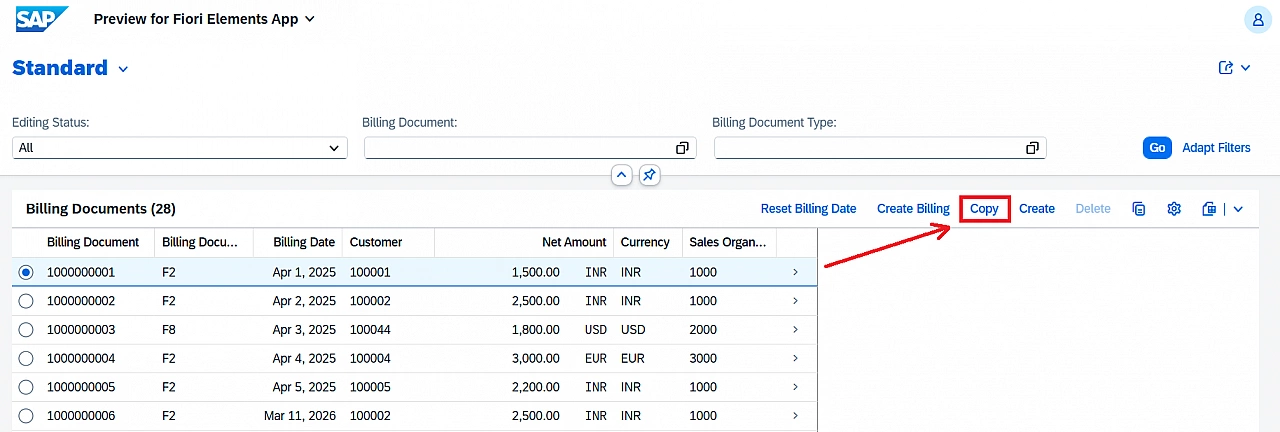
We will be redirected to the object page with a new Billing Document ID.
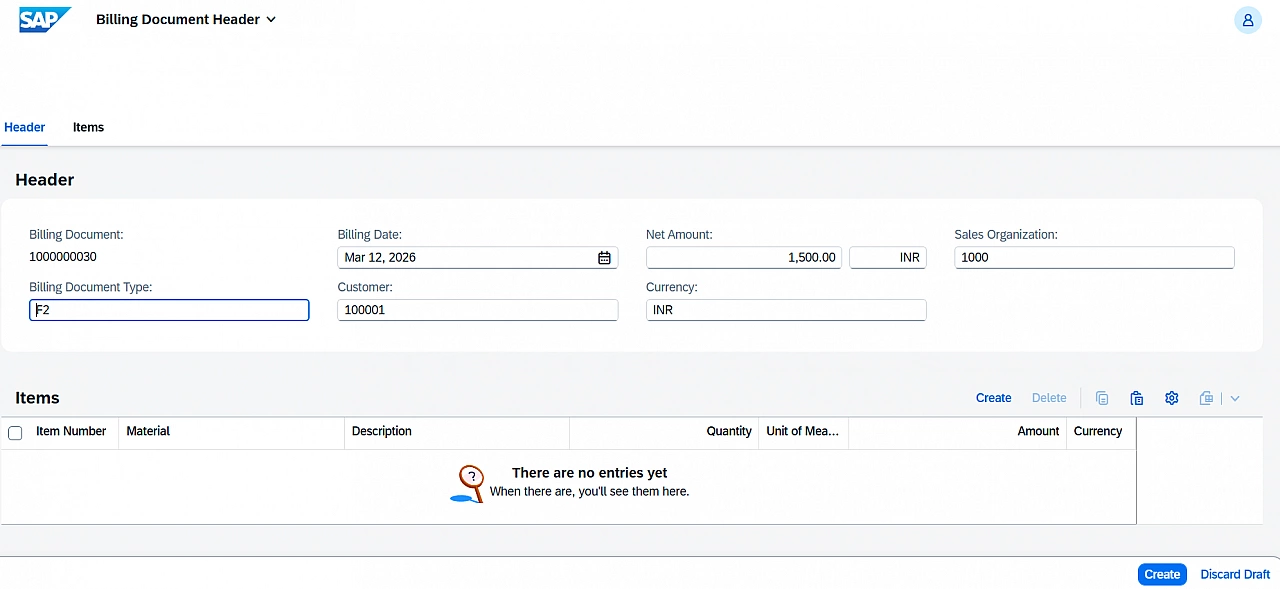
An important point to observe is that the object page opens in edit mode. This happens because our application has draft enabled and in our logic we passed %is_draft as true.
When an instance is selected and used to trigger a factory action, the RAP framework passes %is_draft through the action parameters.
%is_draft = keys[ KEY entity %key = -%key ]-%param-%is_draftBut what exactly is %is_draft and how does it influence the lifecycle of a RAP instance? We will explore that in the next blog.
Can we implement a static action instead of a static factory action?
A common question that comes up is whether we can implement a static action instead of a static factory action when we want to create new instances.
Technically, yes. Both static actions and static factory actions can create new instances and both can accept parameters.
However, the difference lies in how RAP interprets these actions.
A static action is a general purpose operation. RAP does not assume that the action will create new instances. It may perform any business logic such as calculations, validations, or triggering processes.
A static factory action, on the other hand, explicitly represents a creation operation. By defining the action as a factory action, we are telling the RAP framework that the purpose of this action is to create new BO instances.
Because of this, factory actions integrate more naturally with RAP concepts such as instance mapping, draft handling, and UI navigation.
So while both approaches may technically work, whenever the intention of the action is to create or copy BO instances, we should prefer factory actions.