
In RAP applications, not every field should be stored in the database.
Sometimes, we need a field that:
-
Is calculated at runtime
-
Depends on other entities
-
Should not be persisted
-
Should be displayed in UI
-
Should not affect the database schema
This is where Virtual Elements come into the picture.
In this blog, we will:
-
Understand what virtual elements are
-
See where they can be defined
-
Implement a virtual field
TotalAmount -
Write the calculation exit class
-
Understand how the exit class works
What Are Virtual Elements?
A virtual element is a calculated field in a CDS projection/consumption view.
It:
-
Does not exist in the database table
-
Is calculated dynamically at runtime
-
Is not persisted
-
Is read-only by design
Virtual elements are calculated using a global ABAP class that implements a SADL exit interface.
Virtual elements can only be defined in projection (consumption) views, not in interface views.
Our Use Case
In our Billing Document app:
-
Header entity has
NetAmount -
Item entity has
ItemAmount -
One billing document can have multiple items
We want to calculate:
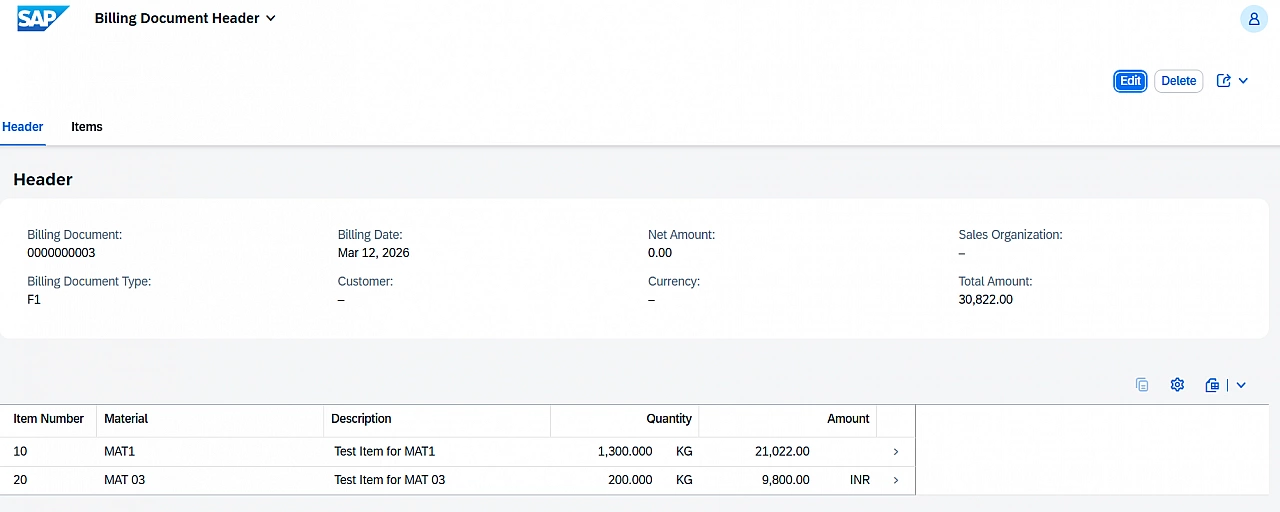
TotalAmount = Sum of all ItemAmount values of that Billing Document
We do not want to:
-
Store this in database
-
Maintain it manually
-
Use determinations
Instead, we compute it dynamically.
Steps to implement Virtual Element
Step 1 – Define Virtual Field in Projection View
We add TotalAmount in the Billing Document Header consumption view zsac_c_bill_header.
@AccessControl.authorizationCheck: #NOT_REQUIRED
@EndUserText.label: 'Consumption view for bill doc head'
@Metadata.ignorePropagatedAnnotations: true
@Metadata.allowExtensions: true
@VDM.viewType: #CONSUMPTION
define root view entity zsac_c_bill_header
  provider contract transactional_query
  as projection on zsac_r_bill_header
{
  key BillId,
      BillType,
      BillDate,
      CustomerId,

      @Semantics.amount.currencyCode: 'Currency'
      NetAmount,

      Currency,
      SalesOrg,

      @Semantics.amount.currencyCode: 'Currency'
      @ObjectModel.virtualElement: true
      @ObjectModel.virtualElementCalculatedBy: 'ABAP:ZSAC_CL_AMOUNT_VE_EXIT'
      virtual TotalAmount : abap.curr(15,2),

      CreatedBy,
      CreateDat,
      LastChangedBy,
      LastChangeDat,
      LocalLastChangeDat,

      _Item : redirected to composition child zsac_c_bill_item
}
Important Annotations
@ObjectModel.virtualElement: true → Marks the field as virtual.
@ObjectModel.virtualElementCalculatedBy → Specifies the ABAP class responsible for calculation. The class must:
-
Be global
-
Implement SADL exit interface
Item Consumption View (Reference)
@AccessControl.authorizationCheck: #NOT_REQUIRED
@EndUserText.label: 'Consumption view for bill doc item'
@VDM.viewType: #CONSUMPTION
@Metadata.allowExtensions: true
define view entity zsac_c_bill_item
  as projection on ZSAC_R_BILL_ITEM
{
  key BillId,
  key ItemNo,
      MaterialId,
      Description,
      Quantity,
      ItemAmount,
      Currency,
      Uom,
      CreatedBy,
      CreateDat,
      LastChangedBy,
      LastChangeDat,
      LocalLastChangeDat,

      _Header : redirected to parent zsac_c_bill_header
}
We will sum ItemAmount from this entity.
Step 2 – Create Virtual Element Exit Class
A virtual element requires a global ABAP class implementing: IF_SADL_EXIT_CALC_ELEMENT_READ
Here is the implementation code:
CLASS zsac_cl_amount_ve_exit DEFINITION
  PUBLIC
  FINAL
  CREATE PUBLIC.

  PUBLIC SECTION.
    INTERFACES if_sadl_exit_calc_element_read.
ENDCLASS.


CLASS zsac_cl_amount_ve_exit IMPLEMENTATION.

  METHOD if_sadl_exit_calc_element_read~calculate.

    "Loop over all requested virtual elements
    LOOP AT it_requested_calc_elements INTO DATA(lv_virtual_field_name).

      "Loop over each row returned by the main query
      LOOP AT ct_calculated_data ASSIGNING FIELD-SYMBOL().

        DATA(lv_index) = sy-tabix.

        "Assign the virtual field dynamically
        ASSIGN COMPONENT lv_virtual_field_name
          OF STRUCTURE <ls_calculated_row>
          TO FIELD-SYMBOL(<lv_total_amount>).

        "Read corresponding original header data
        DATA(ls_header_data) =
          CORRESPONDING zsac_r_bill_header( it_original_data[ lv_index ] ).

        "Read associated item entities for current Billing Document
        READ ENTITIES OF zsac_r_bill_header
          ENTITY zsac_r_bill_header
          BY \_Item
          ALL FIELDS
          WITH VALUE #( ( BillId = ls_header_data-BillId ) )
          RESULT DATA(lt_item_data).

        "Initialize total amount
        CLEAR <lv_total_amount>.

        "Sum all ItemAmount values
        LOOP AT lt_item_data INTO DATA(ls_item_row).
          <lv_total_amount> =
            <lv_total_amount> + ls_item_row-ItemAmount.
        ENDLOOP.

      ENDLOOP.

    ENDLOOP.

  ENDMETHOD.

  METHOD if_sadl_exit_calc_element_read~get_calculation_info.
    "This method is called by the SADL framework prior to the retrieval of data from the database to ensure that all fields necessary for calculation are filled with data
  ENDMETHOD.

ENDCLASS.
Understanding the Exit Class
Let’s understand what is happening.
1. Interface Used
We implement: IF_SADL_EXIT_CALC_ELEMENT_READ
This interface is used for calculating virtual elements during read operations.
2. calculate Method
This method is triggered when:
-
RAP reads data
-
Virtual element is requested
Parameters:
-
it_original_data→ Original CDS result -
ct_calculated_data→ Result table to modify -
it_requested_calc_elements→ List of virtual fields
3. Core Logic Flow
For each header row:
-
Get Billing Document ID
-
Read associated
_Itementities -
Sum all
ItemAmountvalues -
Assign result to
TotalAmount
The calculation happens dynamically at runtime. Nothing is written to database.
Other Virtual Element Exit Interfaces
Depending on use case, you can implement:
-
IF_SADL_EXIT_CALC_ELEMENT_READ→ Used for runtime calculation -
IF_SADL_EXIT_FILTER_TRANSFORM→ Used for custom filter transformation -
IF_SADL_EXIT_SORT_TRANSFORM→ used for custom sorting logic
Important Points about Virtual Elements
According to SAP documentation:
-
Virtual elements are read-only
-
They cannot be persisted
-
They are calculated only during read
-
They should not contain heavy performance logic
They are ideal for:
-
Derived values
-
Aggregations
-
Runtime display fields
Thanks for reading.